Good morning!
Today we have a busy schedule:
1. Cleaning out student storage (but don't start until I talk to you!)
2. Little pop quiz with partner (don't worry, you can talk)
3. Begin learning ISO and creating still life
Wednesday, January 6, 2016

Tuesday, January 5, 2016
Welcome Back, Photo I!!!
First, make sure you check your missing assignments and TALK TO ME about anything you know is in the folder which I have listed as missing. Check your Final project score. Today is the LAST DAY to fix these problems, so take responsibility now.
Second, we are starting Quarter 3! All files will now be saved in your Semester 2>Quarter 3 folder.
Quarter 3 is more technical than previous quarters. We will be learning all the modes on your camera dial and what they do.
You will need a piece of paper today, as we will be drawing a diagram.
Objectives:
By
the end of this lesson you will be able to:1. Language objective: Explain to your camera partner why not to
shoot in auto mode.
First, make sure you check your missing assignments and TALK TO ME about anything you know is in the folder which I have listed as missing. Check your Final project score. Today is the LAST DAY to fix these problems, so take responsibility now.
Second, we are starting Quarter 3! All files will now be saved in your Semester 2>Quarter 3 folder.
Quarter 3 is more technical than previous quarters. We will be learning all the modes on your camera dial and what they do.
You will need a piece of paper today, as we will be drawing a diagram.
Objectives:
By
the end of this lesson you will be able to:1. Language objective: Explain to your camera partner why not to
shoot in auto mode.
2. Content objective: Construct a diagram of the Exposure
Triangle.
Wednesday, December 16, 2015
Finals Schedule / Final Project
Business 8:00-8:25 AM
1st Final 8:25-9:55 AM
Break 9:55-10:13 AM
Passing 10:13-10:20 AM
Business 10:20-10:45
2nd Final 10:45-12:15
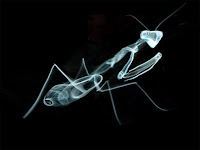
SMOKE SCULPTURES DUE AT THE END OF THE PERIOD
Here is an in-progress and a completed example:
1st Final 8:25-9:55 AM
Break 9:55-10:13 AM
Passing 10:13-10:20 AM
Business 10:20-10:45
2nd Final 10:45-12:15
SMOKE SCULPTURES DUE AT THE END OF THE PERIOD
Here is an in-progress and a completed example:


Monday, December 14, 2015
Hi Guys,
Today we are working on ILLUSIONS. Remember, the name of the game here is experimentation and creativity. Just try things out, then look at your results and adjust your position/technique, and retry. Its all about trying-->adjusting-->trying again until you get it right.
TOMORROW IS THE LAST DAY TO BRING CANS FOR EXTRA CREDIT!
Bring them in advisement just to be safe, because I don't know when the people will pick the barrel up.


You will be turning in ONE contact sheet of your four BEST illusions with your partner. Yes, this one time you get to share work. Thats ONE contact sheet of four images with 2 people's last names on it.
Don't forget to do levels and basic cropping.
Friday, December 11, 2015
Thursday, December 10, 2015
Rainy Day schedule :( :( :(
Open a new
document in Microsoft Word.
Click
“insert” and insert your best photo yet. Resize your photo so it’s small enough
to fit in the Word document.
Write a
critique of your picture. (At the very least 1 page double spaced) Make your
sentences complete and use descriptive language. This will be written like a
discussion paper, not a numbered list.
Here are
steps to guide you for each paragraph:
1.
Describe your
photo. What is the photo of? What objects can you see in it? Talk about the
time of day, location, people, plant life, animals, building or other materials
you see.
2.
Talk
about the composition. What angles, or viewpoints were
used to shoot the photo? Was the rule of thirds used,
and how? (What objects or parts of the photo are lined up on what part of the
grid)
3.
Describe
the use of elements. Is shape used? Texture?
Value, color, space, form, line? Talk
about where and how. If an element is not used, its ok to say so, for example:
“This photograph does not use color since it is black and white” or simply,
“There are no shapes in this photo”.
4.
Describe
and discuss what you like about it and why.
5.
Describe
and discuss what you think could be done differently and why.
Save your image as lastname_firstname_selfcritique.doc
Tomorrow we will be peer-reviewing them and checking for vocab usage.
Save your image as lastname_firstname_selfcritique.doc
Tomorrow we will be peer-reviewing them and checking for vocab usage.
Wednesday, December 9, 2015
Zero Gravity Illusions
Today we are starting our last project before winter break. Its creative, fun, and a little more challenging than it looks. Check out some examples below:


Tuesday, December 8, 2015
As with yesterday, today you will finish and turn in your nature name and contact sheet. If you are already finished, you may work on doing more names for extra credit OR you may do the short tutorial on zoom blur effects.
OR you may follow this link to learn to give a photograph jigsaw puzzle effect here:
http://www.photoshopessentials.com/photo-effects/photoshop-puzzle/
Don't worry, it looks REALLY long but it's just a lot of pictures. The steps are fairly simple. You might have trouble finding the "texturizer" because we have a different version of Photoshop than they do. Here's the trick:
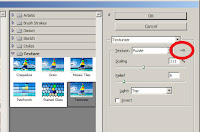 Click Filter -->Filter Gallery-->Texture--->Texturizer
<---------Click this little settings tab.
Click Load Texture
Go to the M:/ Miss E folder and select the puzzle.psd file I have left there.Click Open. Play with the sliders until you like the look and size of your puzzle pieces.
OR you may follow this link to learn to give a photograph jigsaw puzzle effect here:
http://www.photoshopessentials.com/photo-effects/photoshop-puzzle/
Don't worry, it looks REALLY long but it's just a lot of pictures. The steps are fairly simple. You might have trouble finding the "texturizer" because we have a different version of Photoshop than they do. Here's the trick:
 Click Filter -->Filter Gallery-->Texture--->Texturizer
<---------Click this little settings tab.
Click Load Texture
Go to the M:/ Miss E folder and select the puzzle.psd file I have left there.Click Open. Play with the sliders until you like the look and size of your puzzle pieces.
Monday, December 7, 2015
Thursday, December 3, 2015
Nature Alphabet
 Continue working on collecting your Natural Alphabet.
Remember: SHOOT IN PORTRAIT ORIENTATION (You must turn the camera sideways)
Remember to SHOOT IN BLACK AND WHITE when possible
When you get back to your computer:
Rotate if needed by clicking Image-->Image Rotation-->90 CW
Remember to CROP TO A 5x7" on EVERY photo
Adjust your LEVELS on every photo
Save all of your letters in their own folder. If you finish editing EVERY picture (remember, they must be cropped to a 5x7!) you can run a 5 column, 6 row contact sheet.
Subscribe to:
Posts (Atom)